
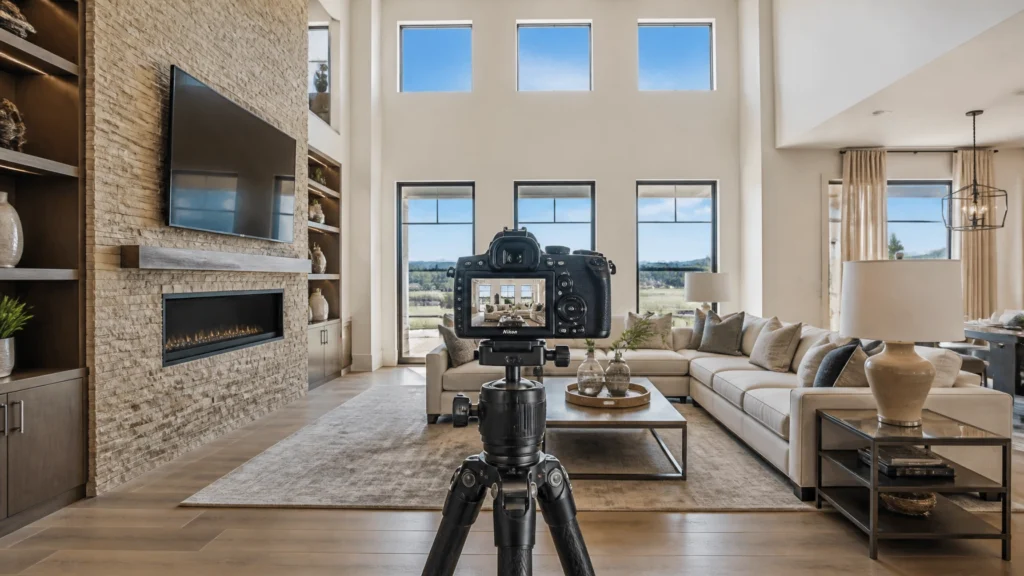
If you’ve been following RE Media Systems for a while, you know I’m a big fan of efficiency. After photographing over 10,000 homes, I’ve learned that you don’t always need the most expensive flagship camera to deliver world-class results. You need a tool that fits your workflow, handles high-contrast scenes, and doesn’t break the bank.
Enter the Nikon Z5.
When Nikon released the Z5, it was overshadowed by its faster, flashier sibling, the Z6 II. But for those of us in the real estate niche, the Z5 is a bit of a “sleeper” hit. In this guide, I’m going to break down why the Nikon Z5 might be the best value entry point into full-frame photography for real estate professionals today.
1. Quick Verdict: Is the Nikon Z5 Still Worth It?
The short answer: Yes, absolutely.
If your business is primarily built on high-quality HDR stills, the Nikon Z5 is one of the smartest investments you can make. It offers a 24.3MP full-frame sensor, incredible dynamic range, and dual SD card slots, all at a price point that often beats out cropped-sensor (APS-C) competitors.
- Who is it for? Beginners starting their first RE media business or veterans looking for a reliable, high-IQ backup/secondary body.
- Who should skip it? If you are moving heavily into high-end video walkthroughs or need 4K/60p without a crop, you’ll want to look at the Z6 II or Sony A7 IV.
- Worth buying today? Yes. It remains the most affordable way to get into the Nikon Z system with a full-frame sensor.
2. Why I Recommend This Camera
Over the last 14 years, I’ve seen cameras come and go. I started in the DSLR days, lugging around heavy bodies and specialized triggers. The move to mirrorless changed the game for RE photographers, and the Nikon Z5 is a perfect example of why.
I recommend the Nikon Z5 because it focuses on the things that actually matter for real estate: image quality, reliability, and cost-to-performance ratio.
In our workflow at RE Media Systems, we prioritize “shooting faster.” The Z5 doesn’t slow you down. Its ergonomics are nearly identical to the pro-level Z6 II and Z7 II, meaning if you upgrade later, your muscle memory stays the same. Plus, it uses the Z-mount, which gives you access to some of the sharpest wide-angle glass on the market, like the Nikkor Z 14-30mm f/4 S.
For a solo operator or a small team, the Z5 allows you to put more money into your glass and lighting, which will always have a bigger impact on your final image than a slightly faster frame rate you’ll never use on a tripod.
3. Key Features That Matter for Real Estate
When you’re looking at a spec sheet, ignore the “fast action” and “bird eye tracking” fluff. For real estate, we care about a few specific things:
24.3MP Full-Frame Sensor
While it’s not a back-illuminated (BSI) sensor like the Z6 II, the Z5’s sensor is fantastic. At base ISO 100, the dynamic range is massive. This is crucial for our HDR workflow where we need to pull detail out of those bright windows and deep shadows in a single bracketed set.
9-Frame Auto Exposure Bracketing (AEB)
This is a huge win. Many “budget” cameras from other brands limit you to 3 or 5 brackets. The Nikon Z5 allows for up to 9 frames. While I usually shoot 5-frame brackets for most homes, having the ability to go to 7 or 9 for ultra-high-contrast luxury entries or views is a professional necessity.
Dual SD Card Slots
I cannot stress this enough: Never shoot a paid gig on a single card slot. If a card fails (and they do), you lose the job, your reputation, and your time. The Z5 features two UHS-II SD slots, allowing you to record “overflow” or “backup.” For a budget-friendly body, having dual slots is a massive “pro” feature that the competing Canon R8 lacks.
In-Body Image Stabilization (IBIS)
While we shoot 95% of our interiors on a tripod, IBIS is a lifesaver for handheld exteriors, quick detail shots, or those “run and gun” social media clips. The 5-axis stabilization in the Z5 keeps things sharp even when you’re shooting at slightly slower shutter speeds.
Tilting Touchscreen
The 3.2-inch tilting screen is perfect for real estate. Whether you’re shooting from a low “magazine style” height or getting the camera high up to clear a kitchen island, the screen makes composition easy without needing a chiropractor.
4. Real-World Performance: In the Field
How does the Nikon Z5 actually perform when you’re standing in a dark basement or a bright sunroom?

Handling High Contrast (HDR)
In my testing across hundreds of homes, the Z5 handles the “Window Pull” exceptionally well. When shooting 5-frame brackets (+/- 2.0 EV), the files are clean. Even when you have to push the shadows in Lightroom by 2 or 3 stops, the noise levels are remarkably low. It doesn’t have the exact same low-light ceiling as the Z6 II, but since we are almost always at ISO 100 on a tripod, you will never notice the difference in your final delivery.
Speed and Reliability
The Z5 isn’t a “speed demon” in terms of frames per second (4.5 fps), but for real estate, that’s plenty. It cycles through a 5-frame bracket quickly enough that you aren’t standing around waiting between shots. The autofocus is snappy and accurate in well-lit rooms. In very dark rooms, it might hunt a little more than the Z6 II, but switching to manual focus or using a small LED light solves that instantly.
Battery Life
The EN-EL15c battery is a workhorse. I can easily get through 3 or 4 average-sized homes on a single charge. Plus, the Z5 supports USB-C charging and power delivery, meaning you can top it off in the car between shoots or run it off a power bank if you’re doing a long twilight session.
5. Workflow Advantages: Business Outcomes
At RE Media Systems, we don’t just teach you how to take a photo; we teach you how to build a business. The gear you choose should improve your “Bottom Line.”
- Lower Initial Investment: By choosing the Z5 over a Z6 II or Sony A7 IV, you save roughly $600–$1,000. That money can be reinvested into a high-quality tripod or a 14-30mm wide-angle lens.
- Consistency: The Nikon Z color science is excellent. I find that I spend less time “fixing” weird color casts in Nikon files compared to some older Sony sensors. Less time in Lightroom = more time for lead generation.
- Media Costs: Since the Z5 uses SD cards rather than the expensive CFexpress Type B cards required by the Z6 II for its best performance, your ongoing media costs are much lower.
6. Pros and Cons
Pros
- Value: Unbeatable price for a full-frame mirrorless body.
- Dynamic Range: Top-tier performance for HDR stills.
- Dual Slots: Professional redundancy for peace of mind.
- Build Quality: Weather-sealed and feels “pro” in the hand.
- Lens Choice: Access to the incredible Nikkor Z S-line lenses.
Cons
- Video Crop: 4K video has a 1.7x crop, which makes wide-angle video walkthroughs difficult (you’ll need a DX lens or a very wide FX lens).
- Burst Rate: 4.5 fps is slow for sports or weddings, but irrelevant for houses.
- Non-BSI Sensor: Slightly more noise at ISO 3200+ compared to the Z6 II.
7. Who Should Buy This Camera?
- The New Pro: You’re moving from a cropped-sensor DSLR and want the professional look of full-frame without spending $2,500.
- The Hybrid Lite: You shoot 90% photos and only occasionally do simple 1080p social media reels.
- The Nikon Loyalist: You already have Nikon F-mount glass and want a cheap way to adapt them to the Z-mount system.
8. Who Should Skip It?
- The High-End Videographer: If 4K/60p and uncropped 4K are standard in your packages, move up to the Z6 II.
- The Low-Light King: If you frequently shoot night-time events or handheld in extremely dark locations, the Z6 II’s BSI sensor is worth the upgrade.
9. Recommended Accessories for the Nikon Z5
To get the most out of the Z5 for real estate, don’t just buy the kit lens. Here is what I recommend pairing it with:
- Primary Lens: Nikkor Z 14-30mm f/4 S. This is the gold standard for RE photography. It’s sharp, compact, and takes standard filters.
- Backup/Budget Lens: Nikkor Z 17-28mm f/2.8. A bit cheaper than the 14-30mm and faster, though not quite as wide.
- Memory Cards: SanDisk Extreme Pro 64GB or 128GB (UHS-II). Buy two and set them to “Backup” mode in the camera menu.
- Tripod: A sturdy carbon fiber tripod from Benro or Manfrotto.
- Mount: An L-Bracket. This allows you to switch from landscape to portrait for those tight bathrooms without moving the center of your tripod.

10. Alternatives: How Does It Compare?
Nikon Z5 vs. Nikon Z6 II
The Z6 II is better for video and low light. However, for $600 more, you’re essentially paying for features that don’t change the quality of a tripod-based real estate photo. If you don’t do much video, keep the cash and buy the Z5.
Nikon Z5 vs. Sony A7 III
The A7 III is a legend in the RE industry. It has better battery life and a larger third-party lens ecosystem (Tamron/Sigma). But the Z5 has a better EVF, better weather sealing, and a more modern menu system. If you aren’t already in the Sony system, the Z5 is usually a cheaper entry point.
Nikon Z5 vs. Canon R8
The Canon R8 is much newer and has a better sensor and AF. However, the R8 only has one card slot and no IBIS. For professional real estate work, I find the lack of a second card slot on the R8 to be a dealbreaker.
11. FAQ: Nikon Z5 for Real Estate
1. Does the Nikon Z5 have a crop in 4K?
Yes, it has a 1.7x crop. This means your 14mm lens will look like a 24mm lens in 4K. If you do wide video walkthroughs, this is a major limitation.
2. Can I use my old Nikon DSLR lenses on the Z5?
Yes! With the FTZ or FTZ II adapter, almost all Nikon F-mount lenses work perfectly. This is a great way to save money when starting out.
3. Is the autofocus good enough for real estate?
Absolutely. Real estate doesn’t move. Even the most basic mirrorless AF is miles ahead of what we used 10 years ago.
4. Does the Z5 have silent shooting?
Yes. You can use the electronic shutter to be completely silent, great for shooting in occupied homes where the client is working in the next room.
5. How many megapixels do I really need?
24MP is the “sweet spot.” It’s more than enough for high-end print brochures and web listings, but it doesn’t create massive file sizes that slow down your computer and storage.
6. Is the Z5 weather-sealed?
Yes, it has the same level of weather sealing as the Z6 and Z7 series. It can handle a light drizzle or dusty construction sites.
7. Can I charge the Z5 via USB?
Yes, you can charge it or even power it while shooting using a USB-C cable and a compatible power delivery (PD) source.
8. What is the max number of brackets?
The Z5 can shoot up to 9 frames in its Auto Exposure Bracketing (AEB) mode.
9. Is there an L-bracket for the Z5?
Yes, many companies like SmallRig and 3 Legged Thing make custom L-brackets specifically for the Z5 body.
10. Should I buy the Z5 kit lens (24-50mm)?
Honestly? No. It’s not wide enough for real estate. Buy the body only and put the savings toward the 14-30mm f/4 S.
12. Final Recommendation
The Nikon Z5 is the definition of a “workhorse” camera. It provides everything a real estate photographer needs to deliver professional-grade HDR images without the “pro-tax” of high-speed video features you might never use.
If you are looking to shoot faster (thanks to the intuitive menus and 9-frame bracketing) and earn more (by keeping your overhead low), the Nikon Z5 is the best budget full-frame Nikon on the market today.

Ready to upgrade your gear?
Check out our full Recommended Gear Page for my latest picks on lenses, tripods, and lighting.