
Disclosure: This article contains affiliate links. If you purchase through one of these links, RE Media Systems may earn a commission at no additional cost to you. I only recommend tools that fit a practical real estate media workflow.
Table of Contents
- Why Virtual Twilight Makes Sense
- The Four-Step AI Workflow
- How to Keep the Edit Believable
- Disclosure and Ethical Considerations
- How to Price Virtual Twilight as an Add-On
- Frequently Asked Questions
Why Virtual Twilight Makes Sense
After photographing more than 10,000 homes over 14-plus years, I understand why photographers used to offer in-person twilight shoots.
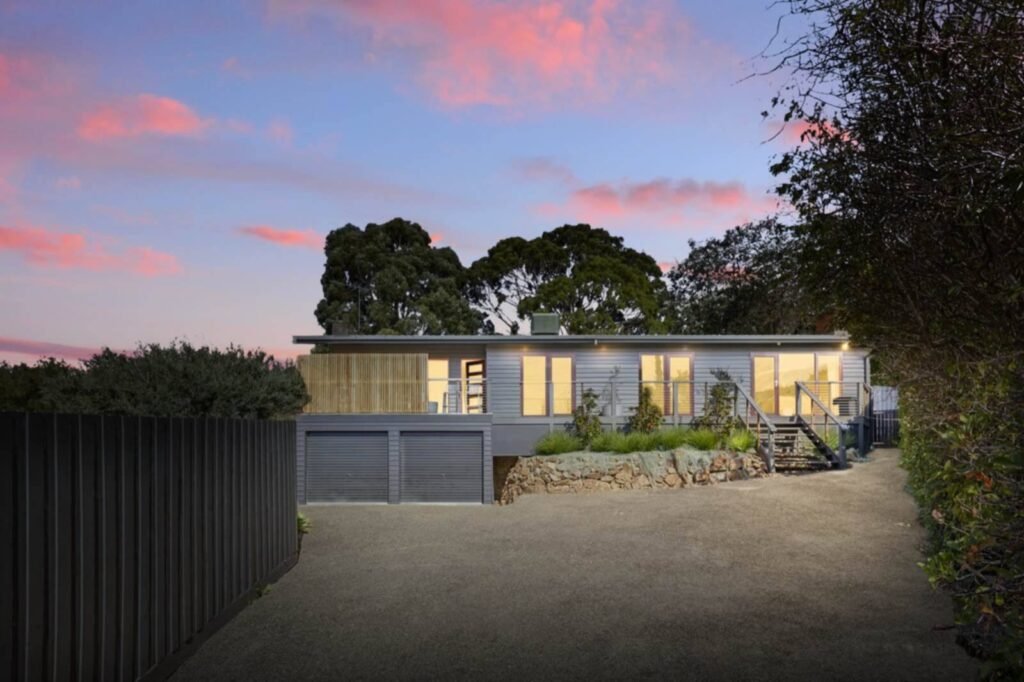
A good twilight exterior can be an excellent hero image. It gives the agent something memorable to use on the MLS, social media, brochures, and listing presentations.
The problem is the time commitment.
You have to coordinate with the homeowner, make sure the lights are on, monitor the weather, drive back to the property at the right time, and work within a very short window between daylight and darkness. If the weather changes or the timing does not work, you may have to repeat the entire process.
I still shoot real twilight images on location when the property or client specifically requires it. But they represent a small portion of my twilight work. For most listings, a virtual twilight gives me the hero image without requiring another trip to the property.
In my video about stopping wasted twilight shoots, I demonstrate how to create these images with AutoHDR. The conversion itself can take less than two minutes per image, depending on the workflow and current processing conditions.
That is the important business advantage: you can deliver a premium-looking add-on without adding another appointment to your schedule.
The Four-Step AI Workflow
1. Select the Right Photo
The first step is choosing a strong daytime exterior image.
You do not need to rescue a weak composition with AI. Start with a photograph that already works as a property hero shot.
Look for:
- A clear view of the front or rear elevation
- Straight vertical lines
- A clean, balanced composition
- Visible windows and exterior lighting
- Enough sky for the software to identify the sky area
- Good exposure across the home, landscaping, and foreground
- No people, vehicles, or objects blocking important architectural details
A single, well-exposed JPEG can work very well for this purpose. You generally do not need to return to the property to capture a special twilight bracket.
The daytime photo should also represent the home honestly. Do not choose an angle that hides a permanent feature, condition issue, neighboring property, or view that a buyer would reasonably expect to see.

2. Prepare the Image
Before sending the image to an AI tool, make sure the base file is ready.
I prefer to complete the normal exterior corrections first. That usually means:
- Correcting vertical perspective
- Straightening the image
- Applying a natural color correction
- Removing obvious temporary distractions, where appropriate
- Checking that the home is sharp and properly exposed
- Exporting a high-quality JPEG in the required color space
This is where a broader editing system can help. My complete HDR real estate photography guide covers the capture and editing principles that make the source image stronger.
The better your original photo, the less work the AI has to interpret. AI is not a replacement for composition, camera technique, or quality control.
3. Convert It with AI
Once your daytime exterior is ready, upload it to your virtual twilight tool and select the day-to-dusk or virtual twilight option.
I use AutoHDR because it already fits into the type of editing workflow many real estate photographers need. It handles HDR processing and other common corrections, while also offering virtual twilight options for selected exterior images.
The workflow shown in my video is straightforward:
- Upload and process the property photos.
- Select the exterior hero image.
- Choose virtual twilight from the available editing options.
- Select a look such as twilight, sunset, or early evening.
- Review the available color variations.
- Generate the result.
Depending on the property, I may choose a natural blue-hour look, a warmer sunset treatment, or an early-evening appearance. The goal is not to use the most dramatic option. The goal is to choose the look that fits the home.
A modern home with cool finishes may suit a restrained blue-hour treatment. A traditional home with warm exterior lighting may work better with a subtle golden evening look.

4. Review and Deliver
Never deliver an AI-generated image without reviewing it at full size.
AI editing is fast, but it can still make mistakes around rooflines, trees, windows, railings, reflections, and small architectural details.
Check the following:
- Is the roofline clean?
- Does the sky meet the building naturally?
- Are window glows contained within the actual windows?
- Are exterior lights placed only where fixtures exist?
- Do shadows and reflections make sense?
- Does the landscaping still look realistic?
- Are siding, brick, trim, and roof colors accurate?
- Has the AI accidentally changed the shape or features of the property?
- Does the image still look like the home in daylight?
If a result looks too artificial, try a less dramatic style or use another source image. In the workflow demonstrated in my video, different virtual twilight variations can be generated so you can compare options. I often provide two suitable choices when that gives the agent useful flexibility.
How to Keep the Edit Believable
The best virtual twilight image changes the mood, not the property.
That means the AI may alter the sky, ambient exposure, and apparent time of day. It should not add a second-storey window, remove a neighboring home, change the landscaping, repaint the exterior, or create architectural features that do not exist.
Here are the standards I use:
Keep the sky consistent with the scene
A dramatic sunset can look impressive, but it may not fit the original conditions or the property itself. A simple twilight gradient is often more believable than an overly colorful sky.
Match the light direction
If the new sky suggests light coming from one direction, the shadows and highlights should not contradict it. Look carefully at trees, roof edges, columns, and landscaping.
Be careful with window lighting
Warm windows can make a home feel inviting, but glowing windows should remain inside the real window frames. Light bleeding across siding or trim is a clear sign that the image needs correction.
Preserve exterior colors
The home’s siding, brick, trim, roofing, and permanent landscaping should remain accurate. A virtual twilight is not an excuse to make the property look materially different.
Avoid over-processing
If the image looks like a movie poster, it probably went too far. Real estate photography should show the home clearly and attractively, not create a fantasy version of it.
For more guidance on responsible AI editing, see our guide to AI virtual staging mistakes and fixes.
Disclosure and Ethical Considerations
Virtual twilight is a digitally enhanced image. That does not automatically make it misleading, but transparency matters.
MLS, brokerage, and real estate board requirements vary by location. Before offering this service, check the rules that apply to your clients and market. Some organizations require a label such as “virtually enhanced” or a note explaining that the sky and lighting were digitally modified.
A practical disclosure might read:
Twilight and sky enhancement applied to exterior photograph. Original daytime image available upon request.
Use the wording required by your local MLS or brokerage. This article is general educational information, not legal advice.
I also recommend retaining the original daytime file. It gives you a clear reference during quality control and allows the agent to provide the original if a buyer or platform requests it.
The ethical line is simple: improve presentation while preserving accuracy. The image should still represent the real home, its real features, and its real surroundings.
How to Price Virtual Twilight as an Add-On
Virtual twilight works best as a repeatable add-on, not as an informal favor.
You can structure it in several ways:
- A per-image add-on
- A package that includes one or two hero-image options
- A premium listing package that includes virtual twilight
- A recurring service included in an agent’s preferred media plan
Do not price it only according to the few minutes of computer processing. The client is paying for the result, your photography, your judgment, your quality control, and the marketing value of having a strong hero image available.
Your pricing should account for:
- Your time selecting and preparing the image
- AI processing or usage credits
- Quality-control time
- Delivery and file management
- Client communication
- The value of avoiding a separate twilight appointment
If the add-on saves a second trip and gives the agent a useful marketing asset, that is a business outcome worth pricing properly. Reduced production time should improve your margin, not automatically become a reason to lower your client pricing.
Virtual twilight can also fit naturally beside other listing services. I recommend building a complete media package that includes photography, video, a virtual tour when appropriate, and premium floor plans in every listing. Floor plans should be presented as a way to communicate layout clearly, not as a guarantee of increased bookings or conversion rates.
For current CubiCasa pricing, always verify the details directly with CubiCasa, since pricing and plan structures can change.
Frequently Asked Questions
1. Do I need to shoot a real twilight photo first?
No. A clean daytime exterior JPEG is the starting point for a virtual twilight conversion. Real twilight photography is still useful for certain properties and client requests, but it is not required for this workflow.
2. Do I need RAW files or brackets?
Not necessarily. The workflow demonstrated in my video uses a single daytime JPEG. A strong source image is more important than adding unnecessary capture steps.
3. How long does a virtual twilight conversion take?
In my AutoHDR workflow, the processing demonstrated in the video takes under two minutes per image. Processing times and software features can change, so check the current service details before setting client expectations.
4. Can I create more than one twilight style?
Yes, depending on the tool and current available options. AutoHDR includes multiple time-of-day and color variations in the workflow shown in the video.
5. Should I always choose a dramatic sunset?
No. Choose the style that fits the property. A restrained early-evening or blue-hour look is often more believable than a highly saturated sunset.
6. Can virtual twilight hide property defects?
It should not. Do not use digital editing to conceal permanent conditions, alter the structure, or misrepresent the property.
7. Do I have to disclose a virtual twilight image?
Follow the rules of your local MLS, brokerage, and real estate board. Many markets require disclosure of digitally enhanced imagery, so verify the exact wording before delivery.
8. Should I include the original daytime image?
I recommend keeping it and making it available when appropriate. You may also choose to include both the daytime and virtually enhanced versions in the listing media set, depending on local rules and the client’s preference.
9. Can I sell virtual twilight as a standalone service?
Yes, but it is usually easiest to deliver when you captured the original daytime image. That gives you control over the composition, quality, and accuracy of the source file.
10. Is AutoHDR the only tool for virtual twilight?
No. Several AI editing platforms offer day-to-dusk services. I recommend comparing the results, turnaround, pricing, revision process, and how well each tool fits your existing workflow. AutoHDR has earned a place in my workflow because it combines virtual twilight with other real estate editing functions.
Final Recommendation
Virtual twilight is one of the most practical AI add-ons for real estate photographers because it solves a real production problem: delivering a premium exterior hero image without scheduling a second visit.
The process is simple:
- Select a strong daytime exterior.
- Prepare it correctly.
- Convert it with AI.
- Review every detail and disclose the enhancement properly.
Used responsibly, this workflow can help you shoot faster, protect your schedule, improve consistency, and earn more from each listing without lowering your prices.
If you want to build a more efficient editing system, start with AutoHDR, watch the complete “Stop Wasting Time on Twilight Shoots” video, and explore the rest of the RE Media Systems guides.