
Affiliate disclosure: Some links in this guide are affiliate links. I recommend equipment based on its usefulness in real client work, not simply because it is available or generates a commission.
After more than 14 years as a full-time real estate photographer and over 10,000 homes photographed, I have learned that buying camera gear is rarely about finding the product with the longest specifications list.
The right gear should do at least one of three things:
- Help you shoot faster.
- Help you deliver better quality.
- Help you earn more from every appointment.
If a piece of equipment does none of those things, it probably does not belong in your working kit.
This guide is designed to help you build a reliable real estate media system for 2026. We will cover cameras, lenses, tripods, geared heads, lighting, drones, video, audio, software, storage, and the accessories that make a professional workflow more consistent.
If you are just starting, you do not need to buy everything at once. Start with a dependable camera, a practical wide-angle lens, a stable support system, and a workflow you can repeat. Add drones, video, floor plans, virtual tours, and automation as your business begins to support those services.
Quick Verdict
The best camera for real estate photography is usually a reliable mirrorless camera with:
- Strong dynamic range.
- Fast and dependable exposure bracketing.
- Good RAW files.
- In-body image stabilization if you plan to shoot handheld.
- A lens system that includes a rectilinear ultra-wide zoom.
- Reliable battery life and storage.
- Enough video capability for the services you actually sell.
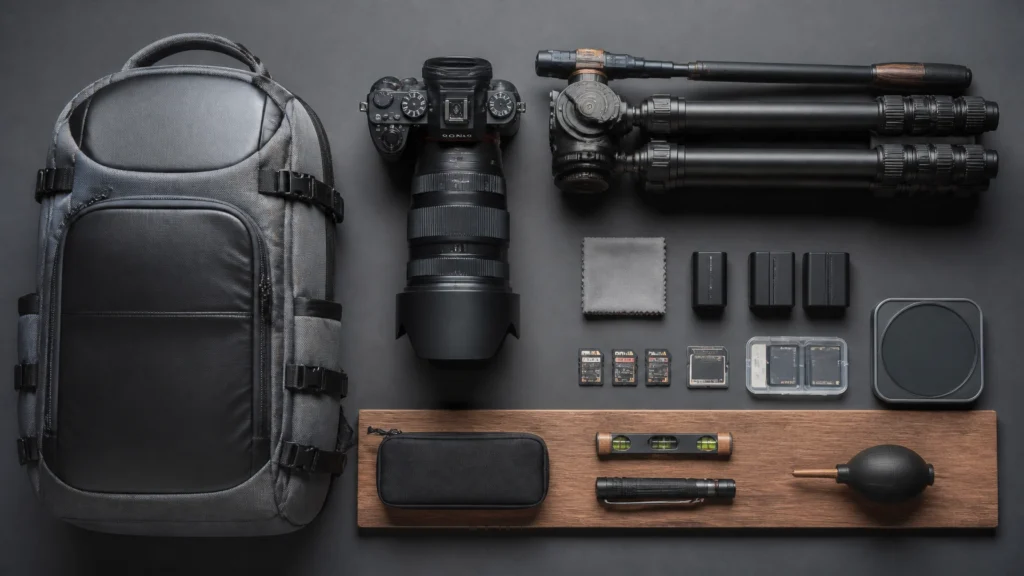
For my current workflow, the Sony A7 V is my primary camera. The Sony A7 V fits the fast handheld HDR workflow I use for a large portion of standard listings.
The Sony A7 IV remains an excellent value-oriented option. It was my workhorse for years and is still capable of producing professional real estate photography without requiring the newest body.
However, there is no universal winner. The best choice depends on your existing lenses, your budget, whether you shoot video, and whether you prefer a tripod-based or handheld HDR workflow.
My short recommendation: Spend more time choosing the right lens and workflow than comparing small differences between modern camera bodies. For most real estate photographers, a good ultra-wide lens and consistent capture system will improve the final result more than moving from one capable mirrorless body to another.
Why I Recommend This Camera System
I have used many different cameras throughout my career. The technology has improved significantly, but the real estate requirements have remained fairly consistent.
A camera for this work needs to handle:
- Bright windows beside dark interiors.
- Mixed lighting in kitchens and living rooms.
- Tight bathrooms and hallways.
- Long shooting days.
- Fast exposure brackets.
- Consistent color from room to room.
- Occasional video, drone, or social media work.
- A high volume of files without making the rest of the workflow difficult.
That is why I do not choose cameras based primarily on megapixels, burst rate, or advanced autofocus modes. Those features can be useful, but they are not the first things that determine whether a camera helps you run a profitable real estate media business.
The camera needs to be dependable when you arrive at a home with a tight schedule. It needs to produce files that edit efficiently. It needs controls that you can operate without stopping to think about every menu setting.
During a standard shoot, I want to make decisions about the property, not fight with the equipment.
The Sony A7 V is my primary camera because it supports a fast, high-volume workflow and provides the image quality I need for modern interior HDR. The Sony A7 IV is a sensible alternative for photographers who want strong full-frame performance at a lower investment.
If you already own Canon, Nikon, or Sony lenses, I would not automatically recommend switching systems. Selling an entire kit, replacing lenses, and relearning your equipment can cost more time and money than the camera upgrade is worth.
Key Features That Matter
1. Dynamic Range
Real estate interiors are difficult because the brightness range can be extreme.
A living room may contain:
- A bright window facing the sun.
- Dark furniture in the foreground.
- Recessed lights on the ceiling.
- A hallway leading into a shadowed room.
- Reflective floors or countertops.
Strong dynamic range gives you more usable information in your RAW files. It does not eliminate the need for careful exposure, but it gives your HDR or blending workflow better source material.
This is why I prioritize dynamic range over excessive resolution. For most listings, a clean 24-megapixel file is more than enough for MLS, websites, social media, and printed marketing materials.
2. Exposure Bracketing
Exposure bracketing is central to a reliable real estate photography workflow.
A common starting point is:
- Three frames at -2, 0, and +2 EV for moderate contrast.
- Five frames at -4, -2, 0, +2, and +4 EV for difficult rooms.
Your camera should make it easy to configure and fire these brackets quickly.
The camera is not creating the final HDR image by itself. It is giving you a set of exposures that can be merged in Lightroom, Photoshop, AutoHDR, or another editing system.
For a complete explanation of capture and editing, read the Complete HDR Real Estate Photography Guide.
3. In-Body Image Stabilization
IBIS is valuable for handheld exteriors, detail images, quick social clips, and handheld HDR workflows.
I still use a tripod when I want maximum consistency, precise composition, or a difficult bracket with slow shutter speeds. But modern stabilization makes it possible to work more quickly in many ordinary rooms.
The important point is not whether handheld photography is always better than using a tripod. The point is that you should have a workflow option that matches the property, the lighting, and the time available.
4. Reliable RAW Files
RAW files give you more flexibility when correcting:
- Window highlights.
- Interior shadows.
- White balance.
- Color casts.
- Exposure inconsistencies.
- Lens and perspective corrections.
Do not let the size of the camera’s megapixel count distract you from the quality and consistency of the files. Larger files can increase storage, backup, culling, and editing requirements.
5. Video Capability
If you sell walkthrough videos, social media reels, or agent content, video matters. But you do not necessarily need a dedicated cinema camera.
A hybrid mirrorless body can be a good choice if you already understand the system and can pair it with:
- A stabilized lens or gimbal.
- An external microphone.
- Consistent white balance.
- A practical video editing workflow.
For dedicated walkthrough work, a compact camera such as the DJI Osmo Pocket 4 Creator Combo can be faster to deploy than a larger mirrorless rig.
Real-World Performance
Bright Windows and Dark Interiors
The most common real estate photography problem is not a lack of resolution. It is the difference between a bright exterior view and a darker interior.
A capable camera helps, but capture technique still matters:
- Compose carefully.
- Keep the camera level.
- Set a practical aperture.
- Use a low ISO when possible.
- Shoot a bracket appropriate to the contrast.
- Check the darkest frame for window detail.
- Blend naturally during editing.
If the dark exposure contains no detail in the windows, software cannot recover information that was never recorded.
For most standard rooms, I would rather have a dependable 24-megapixel camera with fast bracketing and a good lens than an extremely high-resolution body that creates unnecessarily large files.
Handheld HDR
Handheld HDR can save time in standard homes, especially when the camera has good stabilization and can fire a bracket quickly.
My recommendation is to treat handheld HDR as a workflow tool, not a rule.
Use it when:
- The room is reasonably bright.
- You can maintain a fast enough shutter speed.
- You are capturing a standard online listing.
- The composition does not require extremely precise alignment.
- You need to move efficiently through a high-volume shoot.
Use a tripod when:
- The room is very dark.
- You need a slower shutter speed.
- You are shooting a high-end hero image.
- You need exact alignment for a complex blend.
- You are creating architectural work where precision matters more than speed.
High-Volume Shooting
A camera that is comfortable in your hands and easy to configure will save more time over a year than a camera with a feature you rarely use.
You should be able to:
- Change exposure quickly.
- Configure bracketing without searching through menus.
- Review difficult images quickly.
- Replace batteries and cards efficiently.
- Move from stills to video without confusion.
- Maintain consistent color and focus settings.
Your equipment should support a repeatable path through the property. That is the foundation of the 60-Minute Real Estate Photography Workflow.

Workflow Advantages
The right gear is not just about image quality. It affects your entire business.
Faster Capture
A camera with quick bracketing, good ergonomics, and reliable autofocus reduces pauses between rooms.
That matters when you are photographing multiple homes in a day. Saving 30 seconds on each composition can add up to meaningful time by the end of the week.
Less Editing
Good capture reduces editing problems.
A level camera, suitable lens, controlled white balance, and usable bracket make it easier to:
- Correct verticals.
- Blend exposures.
- Preserve window views.
- Match images across a gallery.
- Reduce manual Photoshop work.
For high-volume editing, AutoHDR can help process bracketed files more efficiently. I still recommend reviewing the finished images and using Adobe Creative Cloud, including Lightroom and Photoshop, when a photograph needs detailed correction.
Better Consistency
Agents do not just want one attractive photo. They want an entire gallery that feels consistent.
Consistency comes from repeating:
- Camera height.
- Lens choices.
- Bracketing settings.
- White balance decisions.
- Editing standards.
- Export settings.
- Delivery procedures.
Your camera is one part of that system, but it can either make consistency easier or create unnecessary friction.
More Valuable Appointments
A camera can help you deliver still photography, but a complete real estate media kit can include:
- HDR photography.
- Drone images.
- Video walkthroughs.
- Vertical social media clips.
- Floor plans.
- Virtual tours.
- Virtual staging.
These services can increase your average order value when they are priced and delivered properly. Read the Real Estate Photography Pricing Guide for more on packaging and profitability.
Pros
A Modern Full-Frame Mirrorless System
A full-frame mirrorless camera provides excellent image quality, strong RAW files, and access to professional ultra-wide lenses.
Fast Bracketed Capture
Exposure bracketing makes it easier to handle challenging windows and dark rooms without relying on one exposure.
Hybrid Photo and Video Capability
A capable mirrorless body can support still photography, agent videos, social media content, and occasional behind-the-scenes work.
Flexible Lens Ecosystems
Sony, Canon, and Nikon all offer strong wide-angle options. Third-party manufacturers also provide useful lenses at lower prices.
Better Long-Term Workflow
A good camera system can serve you across thousands of properties. That makes reliability and ergonomics more important than chasing every yearly upgrade.
Cons
New Bodies Are Expensive
The latest camera body may provide improvements, but it may not produce a meaningful business benefit if your current camera already handles your workflow.
High Resolution Can Increase Costs
More megapixels can mean larger files, faster storage requirements, longer backups, and more demanding editing hardware.
A Camera Does Not Fix Poor Composition
A more expensive camera will not correct tilted verticals, poor room selection, clutter, or an overly wide perspective.
Full-Frame Lenses Can Be Expensive
The camera body is only part of the investment. A professional ultra-wide lens may cost as much as, or more than, an entry-level camera body.
Video Adds Complexity
If you add video, you may also need a gimbal, microphone, lights, extra batteries, storage, and editing software. Only buy this equipment when the service is part of your business plan.
Who Should Buy This Camera System?
This type of system is a good fit for:
The New Professional
You want to build a real estate media business rather than simply photograph an occasional listing.
A full-frame mirrorless body paired with an ultra-wide lens gives you room to grow into HDR, video, drone work, and higher-end listings.
The High-Volume Photographer
You photograph several properties each week and need reliable, repeatable equipment.
For you, speed, battery performance, file consistency, and ergonomics matter more than unusual specialty features.
The Hybrid Photo and Video Shooter
You want to provide both stills and walkthrough video without carrying separate systems for every service.
A Sony A7 V, Sony A7 IV, Canon EOS R6 Mark II, Nikon Z6 II, or similar body can be appropriate depending on the system you already own.
The Photographer Moving Into Higher-End Work
You need better control over window views, shadows, color, and lens rendering for luxury homes, builders, designers, or architectural clients.
In this case, the lens, tripod, geared head, and lighting choices become increasingly important.
Who Should Skip It?
You may want a different solution if:
- You already own a capable camera and your real problem is editing speed.
- Your existing lenses do not cover the focal lengths you need.
- You mainly shoot quick vertical social media clips.
- You are still building a portfolio and have not booked consistent paid work.
- You need a lightweight travel kit more than a full professional system.
- You primarily create video and would benefit more from a dedicated gimbal camera.
For a compact video-first setup, consider the DJI Osmo Pocket 4 Creator Combo. For quick phone-based social content, the DJI Osmo Mobile 7P may be more practical than adding another large camera.
Recommended Accessories
Ultra-Wide Lenses
Your lens choice has a major influence on the final image. You want a wide field of view without making rooms look unnaturally stretched.
For Sony full-frame:
- Sony FE 16-35mm f/2.8 GM II: Versatile primary lens for interiors, exteriors, and higher-end work.
- Sony FE 12-24mm: Useful for very tight rooms and expansive spaces.
- Sony E 10-18mm f/4: APS-C option for photographers using a crop-sensor Sony body.
For Canon RF:
For Nikon Z:
Third-party alternatives include:
- Tamron 11-20mm f/2.8
- Tamron 17-28mm f/2.8
- Sigma 16-28mm f/2.8
- Sigma 18-50mm f/2.8
- Tokina 11-18mm f/2.8
Do not automatically use the widest setting. Use the focal length that shows the room accurately and keeps distortion under control.
Tripods
A stable tripod remains valuable, even if you use handheld HDR for many standard listings.
Options include:
- Manfrotto 055 Aluminum Tripod
- Gitzo GT2542 Mountaineer
- Manfrotto 290 Xtra
- Vanguard Alta Pro 2+
- Benro Adventure Aluminum Tripod
- Sirui Carbon Fiber Travel Tripod
A heavy tripod may be more stable, while a carbon-fiber model may be easier to carry between multiple properties. Choose the one you will actually use.
Geared Heads
For precise composition and straight vertical lines:
A geared head is not mandatory for every photographer, but it can make small architectural adjustments much faster and more precise.
Lighting
I prefer natural-looking light and efficient HDR for most standard listings, but supplemental lighting is useful for difficult rooms, hero images, and video.
Recommended options include:
Use flash to solve a lighting problem, not simply because you own one. Poorly controlled flash can create harsh reflections, inconsistent color, and more editing work.
Video and Audio
For walkthrough videos:
- DJI RS 5 for stabilized camera movement.
- DJI Osmo Pocket 4 Creator Combo for compact cinematic walkthroughs.
- DJI Mic 2 for dependable wireless audio.
- DJI Mic Mini as a lightweight or backup option.
- DaVinci Resolve Studio for video editing.
Clean audio immediately makes a walkthrough feel more professional. The built-in microphone on a camera is rarely the best choice for narration or agent interviews.
Drone Equipment
The DJI Air 3S is my primary drone for real estate work because it is reliable, quick to deploy, and gives me multiple focal-length options.
The DJI Mini 5 Pro is the more lightweight option for tight neighborhoods, travel, and situations where quick deployment matters.
Do not forget to account for batteries, transportation, local regulations, insurance, and weather when adding drone services to your business.

Alternatives
Sony A7 V vs. Sony A7 IV
The Sony A7 V is my current primary camera and is the better choice if you want the newest version of my workflow.
The Sony A7 IV is still a strong value option. If you can find it at a significant discount, the money saved may be better invested in a lens, tripod, lighting, backup system, or editing software.
Full Frame vs. APS-C
Full frame offers a familiar path for professional real estate work, especially when paired with lenses such as a 16-35mm or 14-30mm.
APS-C can absolutely work. The Sony a6700, for example, can be a practical option for photographers who want a smaller kit. The important consideration is choosing a lens wide enough for interiors, such as a 10-18mm or 11-20mm equivalent.
Sony vs. Canon vs. Nikon
All three systems can produce professional real estate images.
Choose based on:
- The lenses you already own.
- Your preferred controls and ergonomics.
- The video features you need.
- The availability of used equipment.
- The cameras and lenses you can afford without damaging your cash flow.
The best system is the one you can operate confidently and support with the right lens.
Camera Upgrade vs. Editing Upgrade
If your current camera produces clean RAW files and reliable brackets, an editing or workflow upgrade may provide a better return.
Consider investing in:
- AutoHDR for automated HDR processing.
- Adobe Creative Cloud for Lightroom and Photoshop.
- A calibrated monitor.
- Faster storage and backup.
- A professional delivery platform such as HDPhotoHub, Aryeo, or Spiro.
FAQ
1. What is the best camera for real estate photography in 2026?
For my workflow, the Sony A7 V is my primary recommendation. The Sony A7 IV remains a strong value option. However, a comparable Canon, Nikon, or APS-C mirrorless camera can also produce excellent results when paired with the right lens and workflow.
2. Do I need a full-frame camera?
No. Full frame is helpful, but it is not mandatory. A good APS-C camera with an appropriate ultra-wide lens can produce professional real estate photography.
3. How many megapixels do I need?
Around 24 megapixels is enough for most MLS, web, social media, and standard print requirements. Higher resolution is useful when you need significant cropping or large-format output, but it also increases file sizes.
4. What is the best lens for real estate photography?
A rectilinear ultra-wide zoom is the most useful starting point. For full frame, a 14-30mm or 16-35mm lens is a practical range. Avoid choosing a lens solely because it is the widest option available.
5. Should I use a tripod?
A tripod is still the most reliable tool for precise composition, slow exposures, and difficult HDR scenes. Handheld HDR can be faster for suitable rooms, but it should not replace a tripod in every situation.
6. Do I need a geared head?
No, but a geared head can make precise adjustments easier. It is particularly useful when you want straight verticals and consistent architectural compositions.
7. Should I use three or five exposure brackets?
Use three exposures for most rooms. Use five when the contrast is extreme or the darkest three-frame exposure does not preserve enough window detail.
8. Is flash necessary for real estate photography?
Not for every listing. A modern HDR workflow can handle many homes without flash. Flash becomes more useful for difficult lighting, polished hero images, dark rooms, and higher-end architectural work.
9. What camera settings should I start with?
A practical starting point is RAW, manual exposure, low ISO, approximately f/8, fixed white balance, and three-frame bracketing at ±2 EV. Adjust based on the room and your camera.
10. Is autofocus important for real estate photography?
Reliable autofocus is useful, but real estate is mostly stationary. For bracketed interiors, focus once and switch to manual focus before capturing the full bracket.
11. What is the best drone for real estate photography?
The DJI Air 3S is my primary recommendation for a dependable professional workflow. The DJI Mini 5 Pro is better suited to photographers who prioritize a lightweight, quick-deploy setup.
12. What microphone should I use for real estate video?
The DJI Mic 2 is my main audio recommendation for clean wireless audio and simple setup. The DJI Mic Mini is a lightweight backup option.
13. Should I buy a camera or lens first?
If your current camera is functional and produces usable RAW files, prioritize the lens first. A suitable ultra-wide lens can make a larger difference to real estate compositions than a small camera-body upgrade.
14. How often should I upgrade my camera?
Upgrade when your current camera creates a measurable business problem: unreliable operation, insufficient bracketing, poor file quality, inadequate video, or workflow limitations. Do not upgrade simply because a newer model exists.
15. What is the most important piece of gear?
The most important piece of gear is the one that helps you produce consistent results on every paid shoot. For many photographers, that is the camera-and-lens combination. For others, the biggest improvement will come from a tripod, editing workflow, backup system, or delivery platform.
Final Recommendation
Build your gear system in this order:
- Camera body: Choose a reliable mirrorless camera with strong RAW files and dependable bracketing.
- Ultra-wide lens: Invest in a rectilinear lens that shows rooms accurately.
- Support: Add a stable tripod and, if useful, a geared head.
- Batteries and storage: Carry backups so one failure does not stop a paid shoot.
- Editing system: Use Lightroom, Photoshop, AutoHDR, or a combination that gives you consistent results.
- Delivery and automation: Use a client platform to reduce administrative work.
- Add-on services: Add drones, video, audio, floor plans, virtual tours, and virtual staging when they improve your average appointment value.
My current recommendation is the Sony A7 V paired with a versatile ultra-wide lens such as the Sony FE 16-35mm f/2.8 GM II, supported by a dependable tripod, a practical HDR workflow, and efficient editing software.
But do not feel pressured to buy the most expensive setup. The Sony A7 IV, Nikon Z5, Canon mirrorless bodies, and capable APS-C systems can all be viable choices when matched with the right lens and a disciplined process.
The camera is only one part of the business.
The real advantage comes from using equipment that allows you to move through homes efficiently, preserve difficult lighting, deliver consistent galleries, and spend less time fixing avoidable problems.
That is the standard I use after photographing more than 10,000 homes: Will this help me shoot faster, earn more, or deliver better quality?
If the answer is yes, it may be worth adding to your kit. If the answer is no, keep your money and improve the system you already have.
Next Steps
- Explore the complete Recommended Gear list.
- Read the Complete HDR Real Estate Photography Guide.
- Follow the 60-Minute Real Estate Photography Workflow.
- Read the Real Estate Photography Pricing Guide.
- Browse the RE Media Systems Guides.
- Watch the RE Media Systems YouTube channel.
Build a kit that supports your business, not a collection of gear that keeps you shopping.
Shoot faster. Earn more. Build a better real estate media business.