
This article provides general information, not legal advice. Rules vary by jurisdiction and MLS; verify current requirements with the applicable authority or legal counsel.
Important: This article provides general educational information, not legal advice. Real estate photographers should confirm current requirements with the listing broker, their local MLS, and a qualified real estate attorney before creating or publishing altered listing images.
AI virtual staging is one of the easiest ways for a real estate photographer to add value to a vacant listing.
A good virtually staged image helps buyers understand how a room could function. It can make an empty living room feel more inviting, show the potential of an unused bedroom, and give an agent another marketing asset without the cost and logistics of physically moving furniture.
But the speed of AI creates a responsibility that photographers cannot ignore: buyers must be able to tell what is real and what has been digitally added or changed.
That responsibility became especially important in California on January 1, 2026, when Assembly Bill 723 took effect. The law addresses digitally altered real estate images and requires disclosures when those images are used to promote property for sale.
MLS organizations have also introduced or clarified their own procedures. For example, CRMLS requires the original image to appear immediately before or after the digitally altered image and requires a clear label in the photo description field.
I have photographed more than 10,000 homes over the past 14 years. In that time, I have learned that protecting client trust is just as important as creating attractive images. A beautiful photo that creates the wrong expectation can cause problems for the agent, the buyer, the seller, and your own business.
This guide explains what photographers need to know and how to build a simple disclosure process into their workflow.
Quick Answer: What Must You Do?
If you create an AI or digitally altered image that adds, removes, or changes elements of the property, the safest process is to:
- Keep the original, unaltered image.
- Clearly identify the altered version as digitally altered or virtually staged.
- Provide access to the original image wherever the listing agent or brokerage controls the marketing.
- Follow the specific rules of the MLS where the property is listed.
- Avoid edits that misrepresent the property’s size, condition, layout, features, view, or surroundings.
- Tell the client exactly which images were altered and how they should be labeled.
- When in doubt, disclose the edit or do not use the image for MLS marketing.
The key principle is simple:
Use virtual staging to show potential, not to make a buyer believe that something exists when it does not.
What Is AI Virtual Staging?
AI virtual staging uses software or artificial intelligence to digitally furnish or redesign a real estate photograph.
Common examples include:
- Adding a sofa, coffee table, rug, or artwork to an empty living room.
- Adding a bed and nightstands to a vacant bedroom.
- Turning an empty room into a home office.
- Replacing existing furniture with a different style.
- Removing furniture that is physically present.
- Adding décor or appliances.
- Changing visible finishes such as flooring, cabinetry, countertops, or wall color.
- Modifying landscaping, views, skies, or surrounding elements.
The important distinction is not whether you used Photoshop, a specialized virtual staging platform, or an AI tool. The important distinction is whether the image changes how the property itself is represented.
A normal HDR edit, color correction, exposure adjustment, crop, or straightening generally improves the photograph without changing the physical property. Adding furniture changes what appears in the room, so it should be treated differently.

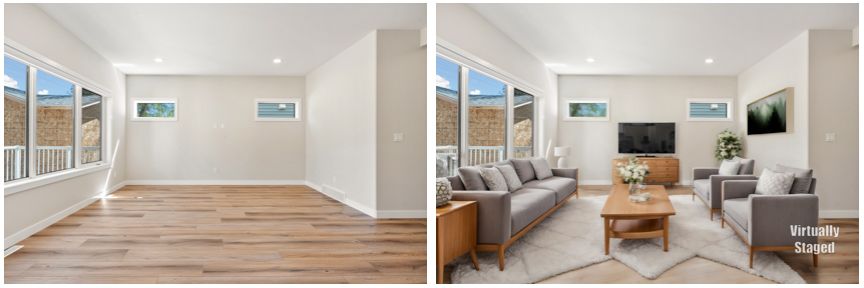
Virtual staging can help buyers visualize a room, but the altered image should be clearly identified and accompanied by the original where required.
What California AB 723 Says About Digitally Altered Images
California AB 723 applies to a real estate broker or salesperson, or a person acting on their behalf, who includes a digitally altered image in advertising or promotion for the sale or lease of real property.
That matters to photographers because we often create the marketing images that agents, brokerages, builders, and property marketers publish.
According to the California Senate Judiciary Committee analysis of AB 723, a digitally altered image is a still photograph changed through photo-editing software or artificial intelligence to add, remove, or change elements of the real property.
The law requires two basic things:
1. A conspicuous disclosure
The image must include a reasonably conspicuous statement that it has been altered. The statement must be located on or adjacent to the image.
This means a disclosure buried in general listing remarks or a website footer may not be enough. A buyer should be able to understand the image’s status while viewing the image.
Suitable language may include:
- “Virtually staged.”
- “Digitally altered image.”
- “AI-altered image, furniture and décor are not included.”
- “Digitally enhanced, see original image.”
- “Furniture shown is digitally added and may not be present.”
The exact wording may vary by MLS or brokerage policy. The safest language is plain, specific, and easy to see.
2. Access to the original image
When the image is posted to a website controlled by the broker, salesperson, or person acting on their behalf, the original unaltered image or a link to it must also be included.
For an MLS, the system may have a specific procedure. CRMLS guidance says the original, unaltered version should appear immediately before or after the digitally enhanced image. The altered image should also be labeled in the photo description field.
That is more specific than simply keeping the original file on your hard drive. Your internal archive is important, but it may not satisfy a platform’s publishing requirement if the consumer cannot access the original.
Which Edits Require Disclosure?
As a practical rule, disclose any edit that changes what a reasonable buyer could believe about the property.
Edits that generally require disclosure
These include:
- Adding or removing furniture.
- Changing the type or quantity of furniture.
- Adding appliances or fixtures.
- Changing flooring, walls, cabinets, countertops, or doors.
- Altering a room’s apparent layout.
- Removing permanent features.
- Removing utility poles, power lines, fences, neighboring buildings, or other contextual elements.
- Changing landscaping.
- Replacing a sky or changing a daytime image to a twilight scene.
- Modifying a view or surrounding environment.
- Removing damage, stains, cracks, clutter, or other conditions that may affect a buyer’s perception.
A particularly important example is furniture removal. If the original room contains furniture and AI is used to make it appear vacant, that is still a digitally altered image. The fact that the edit removes something rather than adding something does not make it a normal photo correction.
Edits that generally do not change the property
The AB 723 analysis and MLS guidance distinguish property changes from ordinary photographic adjustments, including:
- Exposure and brightness adjustments.
- White balance.
- Color correction.
- Contrast.
- Sharpening.
- Cropping.
- Straightening.
- Minor perspective correction.
- Noise reduction.
- HDR blending that preserves the property’s actual appearance.
The phrase “does not change the condition of the real property” is the important test.
For example, balancing a bright window with a darker interior is part of professional real estate photography. Removing the window entirely or replacing the view with something that does not exist is a different category.
If your team is unsure, use the conservative option: preserve the original, label the image, and ask the listing broker or MLS for guidance.
MLS Rules Can Be More Specific Than the Law
AB 723 establishes a legal requirement, but your MLS determines how that requirement is implemented inside its platform.
That means a photographer should not assume that one disclosure workflow works everywhere.
CRMLS’s Digitally Altered Image Guidance and FAQs states that:
- The original must appear immediately before or after the digitally altered image.
- The altered image must be clearly labeled in the photo description field.
- Terms such as “digitally enhanced,” “digitally altered,” or “virtually staged” may be used.
- AI-altered images are included.
- Ordinary lighting, sharpening, white balance, color, cropping, and exposure adjustments are generally not covered when they do not change the property.
- AI-generated landscaping images are not permitted in the MLS under the guidance cited.
SDMLS provides similar practical guidance in its AB 723 Made Simple article. It explains that online and print advertisements should clearly state when an image has been digitally altered and provide a way to view the original.
The implementation may change over time. MLS systems can update their photo-upload fields, labels, warnings, and enforcement procedures. Before publishing a new type of AI image, the listing agent should check the current rules for the relevant MLS.
A practical MLS upload sequence
If the MLS requires adjacent images, a sequence might look like this:
01_LivingRoom_Original.jpg01_LivingRoom_VirtuallyStaged.jpg02_Kitchen_Original.jpg03_Bedroom_Original.jpg03_Bedroom_VirtuallyStaged.jpg
The staged version should have a clear description such as:
Virtually staged, furniture and décor are digitally added. See adjacent original image.
The original version can be labeled:
Original, unaltered image.
Do not assume that putting “virtually staged” in the filename is enough. The agent may need to add the disclosure in the MLS photo description field.
Watermarks Versus Disclosures
A watermark can be useful, but it is not automatically the same thing as a compliant disclosure.
There are three different tools people often confuse:
1. A watermark
A watermark is text placed directly over an image, such as:
Virtually Staged
This makes the status visible when the image is downloaded, shared, or viewed outside the original gallery.
2. A caption or photo description
This is text entered beside the image in the MLS, website, gallery, or marketing platform.
For CRMLS, the photo description field is important. CRMLS guidance states that the photographer does not necessarily need to place a “digitally altered” watermark on the image itself, but the image must be labeled in the description field.
3. A general disclaimer
A statement such as “Some photos may be digitally enhanced” at the bottom of a webpage is not as clear as labeling each affected image.
The safest system uses both a visible image label and a platform-specific caption when practical. But the exact requirement depends on where the image is published.
How to Disclose Images on Different Platforms
MLS listings
Follow the MLS’s required process. In California, that may mean:
- Uploading the original and altered images together.
- Placing the original immediately before or after the altered image.
- Labeling the altered image in the photo description field.
- Avoiding unsupported edits to landscaping, permanent features, or property condition.
Brokerage websites and listing pages
Place a disclosure directly on or next to the image. Provide the original image beside it or link to the original.
A two-image layout works well:
| Original photo | Virtually staged photo |
|---|---|
| Original, unaltered image | Virtually staged, furniture digitally added |
This is clear to buyers and easy for agents to explain.
Social media posts
Social platforms often separate the image from the caption when content is shared. Put the disclosure in both places when possible.
For example:
Virtually staged: Furniture and décor have been digitally added to show one possible use of the room. View the original vacant-room photo here: [link].
If you publish a carousel, include the original and staged image together and label each slide.
Paid advertisements
A buyer may see a paid ad without visiting the full listing. Include “Virtually staged” or “Digitally altered image” in the creative itself or immediately beside it.
Do not rely exclusively on a link that most people will never open.
Print flyers and brochures
Print material creates a special challenge because there may be no room for a full original image. Use a clear disclosure and a QR code or short URL linking to the original image.
Example:
Virtually staged image. Furniture and décor are digitally added. Scan to view the original photograph.
Test the QR code before the flyer is printed.
What Ethical Virtual Staging Looks Like
Compliance is the minimum standard. Ethical marketing requires more.
When a buyer looks at a virtually staged image, they should still be able to understand:
- The actual room dimensions.
- The actual doors and windows.
- The actual flooring and finishes.
- The current condition.
- What is included with the property.
- What is only a design suggestion.
Virtual staging should help a buyer imagine possibilities. It should not hide limitations.
Avoid changing the physical architecture
Do not use AI to:
- Add a bedroom.
- Move a wall.
- Enlarge a window.
- Add a fireplace.
- Create a garage.
- Change ceiling height.
- Make a small room appear substantially larger.
- Add a pool or water feature.
- Remove a neighboring building.
- Replace an unattractive view with a mountain, lake, or city skyline.
These edits can materially change a buyer’s understanding of the property.
Do not conceal defects
Removing a temporary item such as a trash can may be acceptable in some workflows, but removing a crack, water stain, damaged flooring, structural concern, or visible maintenance issue is not a harmless cleanup.
If the edit could affect a buyer’s decision, show the real condition.
Make the staging believable
Even when the disclosure is correct, poor staging damages trust. In my experience, the most common quality problems include:
- Furniture that is too large or too small.
- Objects floating above the floor.
- Missing contact shadows.
- Furniture blocking doors or walkways.
- Styles that conflict with the architecture.
- Different furniture appearing in photos of the same room.
- AI-generated details that are visibly distorted.
The buyer may forgive a vacant room. They are less likely to forgive a staged image that looks deceptive or careless.

A Photographer’s Disclosure Workflow
Here is the process I would build into a real estate media business.
Step 1: Capture a clean original
Photograph the room as it exists. Keep the composition, straight vertical lines, and room geometry accurate.
Your original should be a finished, professional photograph, not necessarily an untouched RAW file. Normal HDR processing and color correction are part of your photography workflow.
Step 2: Create a separate staged version
Never overwrite the original.
Use clear file names:
123-Main-LivingRoom-Original.jpg123-Main-LivingRoom-Virtually-Staged.jpg
If your editor or AI platform creates multiple versions, keep the approved version separate from rejected generations.
Step 3: Review the staged image
Check:
- Furniture scale.
- Floor contact.
- Shadows.
- Door and window clearance.
- Walkways.
- Architectural accuracy.
- Reflections.
- Consistency with other rooms.
- Whether any permanent feature was changed.
- Whether the image still communicates the real condition.
Step 4: Add the disclosure
Use a visible label or approved caption:
Virtually staged, furniture and décor digitally added. See original image.
For a room that has been digitally cleared:
Digitally altered, furniture digitally removed. See original image.
Step 5: Deliver both versions to the client
Put both files in the client gallery or delivery folder. Do not send only the staged version and expect the agent to know what changed.
A folder structure could look like this:
123-Main-Staging/
├── Original/
│   ├── LivingRoom-Original.jpg
│   └── Bedroom-Original.jpg
└── Virtually-Staged/
    ├── LivingRoom-Virtually-Staged.jpg
    └── Bedroom-Virtually-Staged.jpg
Step 6: Give the agent upload instructions
Include a short note explaining:
- Which files are altered.
- Which files are original.
- The recommended MLS caption.
- Whether the original should be uploaded adjacent to the staged version.
- Any edits that should not be used in MLS marketing.
Step 7: Keep a project record
Store:
- The original image.
- The final staged image.
- The date created.
- The client’s approval.
- The disclosure text provided.
- Any notes about the intended use.
This is good business administration and makes corrections easier if a listing is syndicated incorrectly.
Client Communication Templates
Clear communication prevents most problems.
Order confirmation
Your package includes optional AI virtual staging for the selected images. Virtually staged images will be delivered with the original photographs and should be labeled clearly anywhere they are used in advertising or MLS marketing. Furniture, décor, and other digitally added elements are not included with the property unless separately confirmed.
Delivery message
I included the original and virtually staged versions of the requested rooms. For MLS use, please upload the original beside the staged version if required by your MLS and label the staged image “Virtually staged, furniture and décor digitally added.” Please confirm your broker or MLS’s current requirements before publishing.
Correction message
I noticed that the virtually staged image was published without the recommended disclosure. Please update the caption and add the original image as soon as possible. I have attached both versions again for convenience.
Declining a risky request
I can create a conceptual version for a private presentation, but I would not recommend using this image in the MLS because it changes a permanent feature of the property. I can instead create a clearly labeled design concept that does not misrepresent the current listing.
That last sentence protects the client while still offering a useful alternative.
How Virtual Staging Fits Into Your Business Model
Virtual staging can help you earn more, but it should be sold as a professional service, not as a button you press.
The value comes from:
- Selecting the right rooms.
- Creating a realistic design.
- Maintaining accurate geometry.
- Checking the result.
- Delivering original and staged versions.
- Helping the agent publish the images correctly.
For a vacant home, a “hero room” package may be easier to sell than staging every image. You could offer:
- Three staged images.
- Five staged images.
- A vacant-listing package.
- A premium listing package that includes photos, drone, video, floor plans, and virtual staging.
Use your real estate photography pricing guide to think through how the add-on fits your broader pricing structure.
If you want to test a dedicated tool, you can explore Virtual Staging AI here. It is designed to furnish rooms quickly and offers multiple design styles. However, no software can make legal decisions for you. You are still responsible for checking the image, preserving the original, and communicating the disclosure requirements to your client.
Recommended Internal Workflow Resources
Virtual staging works best when it is part of a complete, repeatable media workflow.
These RE Media Systems resources can help:
- AI Virtual Staging Mistakes and Fixes
- AI for Real Estate Photographers
- Real Estate Photography Editing Workflow
- Complete HDR Real Estate Photography Guide
- Complete Real Estate Photography Shot List
- Recommended Gear
The goal is not to add complexity. The goal is to create a system that makes the correct process the easiest process.
AI Virtual Staging Compliance Checklist
Before delivering a virtually staged image, confirm:
- I saved the original image.
- The staged version has a separate file name.
- The edit does not change the room’s architecture.
- The furniture scale is realistic.
- Doors, windows, walkways, and fixtures remain accurate.
- No defects or permanent elements were improperly hidden.
- The staged image is clearly labeled.
- The original image is included or linked where required.
- The agent knows which image is original and which is altered.
- The MLS rules have been checked.
- The client understands that the digitally added items may not be included.
- Any external advertising uses a visible disclosure.
- The project files and disclosure notes are archived.
Frequently Asked Questions
Does every AI-edited real estate photo need a disclosure?
Not necessarily. Ordinary edits such as exposure, white balance, cropping, sharpening, and color correction generally do not require a digitally altered disclosure when they do not change the property itself. AI virtual staging and edits that add, remove, or change property elements should be disclosed.
Does virtual staging need to be disclosed in California?
Yes, California’s AB 723 and related MLS procedures require disclosure for digitally altered images used in applicable real estate promotion. The exact implementation depends on the MLS and platform.
Does the original have to be uploaded beside the virtually staged image?
Some MLSs, including CRMLS under its published guidance, require the original to appear immediately before or after the altered image. Other platforms may use a link or another method. Always follow the relevant MLS’s current instructions.
Is a watermark legally required?
A watermark may be helpful, but it is not always the required method. CRMLS guidance emphasizes labeling the image in the photo description field. For websites, social media, and print marketing, placing a visible disclosure on or next to the image is a strong practical approach.
Can I remove furniture with AI?
Removing furniture is still a digital alteration. Preserve the original and disclose that furniture was digitally removed. Confirm whether the specific MLS permits the image.
Can I change the landscaping?
Be careful. CRMLS guidance states that AI-generated landscaping images are not permitted in the MLS under its guidance. Do not publish altered landscaping without confirming the current MLS rules and the actual status of the seller’s improvements.
Can I remove a power line or utility pole?
Removing a contextual or permanent element can change how a buyer understands the property and its surroundings. Do not remove it for MLS marketing unless your broker and MLS expressly confirm that the edit is permitted.
Should I put the disclosure in the file name?
A clear file name is useful for your internal workflow, but it should not be your only disclosure. Use the required MLS caption, image label, or adjacent text as well.
What should I write on the image?
A concise statement is best:
Virtually staged, furniture and décor digitally added. See original image.
If you changed more than furniture, state that clearly.
Is AI virtual staging deceptive?
Virtual staging is not inherently deceptive. It becomes deceptive when the image is presented as a current, accurate photograph without disclosure or when it changes the property’s physical characteristics.
Who is responsible, the photographer or the agent?
Responsibility may depend on the law, the agreement between the parties, and who controls the publication. Photographers should not assume that the agent will fix every issue. Deliver compliant files, provide written instructions, and communicate clearly.
Does a private buyer presentation have the same rules as an MLS listing?
The rules may differ by use and jurisdiction, but transparency is still the correct standard. Label the image and show the original whenever it could influence a buyer’s understanding.
What if the listing is outside California?
AB 723 is a California law. Other states, brokerages, MLS organizations, and advertising platforms may have their own requirements. The safest national policy is to disclose meaningful digital alterations and preserve the original.
Can virtual staging help me earn more?
Yes, when it solves a real client problem and is delivered professionally. It can be a profitable add-on for vacant listings, but the service should include quality control, clear pricing, original files, and disclosure guidance.
Final Recommendation
AI virtual staging is a valuable service for real estate photographers. It can help agents market vacant homes, help buyers understand room potential, and increase the value of each assignment.
But speed cannot replace judgment.
The professional standard in 2026 is straightforward:
Show the potential, identify the alteration, preserve the original, and never make the property appear to be something it is not.
Build disclosure into your file naming, editing, delivery, and client-communication systems. Check the current MLS rules before publishing. If a request could mislead a buyer, decline it or create a clearly labeled conceptual image for a limited purpose.
That approach protects your clients, supports honest marketing, and strengthens your reputation. It also turns virtual staging into a reliable business service instead of a risky shortcut.
At RE Media Systems, the goal is always the same: help photographers shoot faster, earn more, deliver better quality, and build a stronger real estate media business.
Ready to add virtual staging to your workflow?
- Review AI Virtual Staging Mistakes and Fixes.
- Try Virtual Staging AI for your next vacant listing.
- Explore the RE Media Systems Recommended Gear.
- Subscribe to the RE Media Systems newsletter for practical systems, workflows, and tools for real estate photographers.
Affiliate disclosure: Some links in this article may be affiliate links. We recommend tools based on their potential value to real estate media professionals. Always verify current pricing, features, and compliance requirements before purchasing or publishing content.