
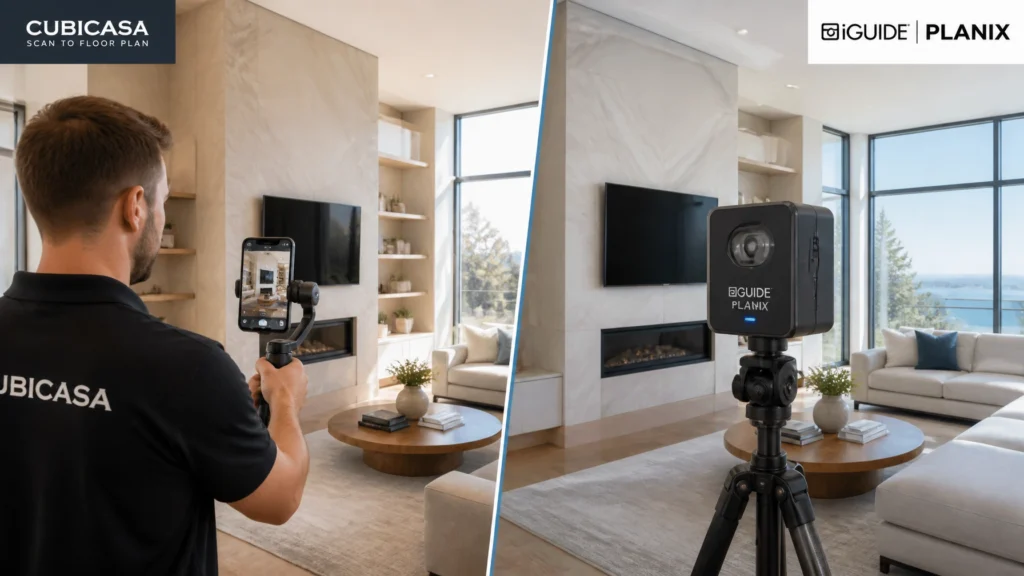
If you’ve been following RE Media Systems for a while, you know I’m obsessed with efficiency. Over the last 14 years and more than 10,000 homes, I’ve tried almost every gadget and software that promises to make a photographer’s life easier.
Floor plans used to be a massive headache. You either had to sketch them by hand with a laser measure (painfully slow) or use expensive, bulky hardware that took forever to process. I even made a video a while back called “Why I Dumped Matterport” because I couldn’t stand the “donut of death” scanning process and the monthly hosting fees.
Today, the battle for the best floor plan solution has narrowed down to two main contenders: CubiCasa and iGUIDE.
One uses the phone in your pocket to scan a house in five minutes. The other uses a dedicated $2,499 LiDAR camera on a tripod to deliver measurement-grade accuracy and a high-end virtual tour.
Which one should you choose? After thousands of scans using both, here is the honest, no-fluff breakdown of how CubiCasa and iGUIDE stack up in 2026.
The Quick Verdict
If you are a high-volume shooter who wants to add a floor plan to every single listing without adding more than 5 minutes to your shoot, CubiCasa is the winner. It’s fast, has a low barrier to entry, and is incredibly profitable.
If you are a luxury or commercial specialist where measurement accuracy is a legal requirement (ANSI Z765) or if you want a top-tier virtual tour to compete with Matterport, iGUIDE is the winner. The hardware cost is high, but the deliverables are the most professional in the industry.
1. Equipment: Phone vs. Planix
The CubiCasa Approach
CubiCasa is software-first. You don’t need to buy a specific camera. You just download the app on your iPhone or Android. It uses your phone’s camera and (if available) LiDAR sensor to track the room geometry as you walk through.
Pros:
- Zero upfront hardware cost.
- Nothing extra to carry in your bag.
- If your phone breaks, you just log in on a new one.
The iGUIDE Approach
iGUIDE requires the Planix camera system. This is a dedicated piece of kit that features a spinning LiDAR sensor and a 360-degree camera. It sits on a tripod and captures everything from one “station” before you move it to the next.
Pros:
- Looks incredibly professional on-site.
- Captures 360 images and geometry simultaneously.
- Much more accurate than a hand-held phone.
Cons:
- Costs roughly $2,499 USD (plus tripod and bags).
- Another battery to charge and another piece of gear to lug into the house.
2. Scan Time: 5 Minutes vs. 20 Minutes
In this business, time is literally money. If a floor plan adds 30 minutes to my shoot but I only charge $50 for it, I’m actually losing money compared to just shooting another house.
CubiCasa: The Sprint
With CubiCasa, you start at the front door, hit record, and walk the house. You don’t stop. You walk into every room, look at the corners, and you’re done. For a standard 2,500 sq. ft. home, it takes me under 5 minutes.
The “Pro Workflow” we use at RE Media Systems involves scanning the floor plan immediately after the drone shots, before we even bring the tripod inside. You can read more about that in our CubiCasa Pro Workflow guide.
iGUIDE: The Marathon (Relatively)
iGUIDE requires you to set the tripod in every room and hallway. Each “scan” takes about 30–45 seconds. For that same 2,500 sq. ft. home, you’re looking at 15 to 25 minutes on-site.
While it’s way faster than Matterport, it’s still significantly slower than a CubiCasa walk-through. However, remember that iGUIDE is capturing your 360 virtual tour images at the same time. If you sold a virtual tour + floor plan package, iGUIDE is actually the faster combined workflow.

3. Accuracy: Marketing Grade vs. Measurement Grade
This is where the two solutions diverge most sharply.
iGUIDE: The Gold Standard
iGUIDE is accurate within ±0.5%. It is explicitly designed to be ANSI Z765 compliant. If you are working with an appraiser or a builder who needs “measurement-grade” documents that are legally defensible, iGUIDE is the only choice here. It models wall thickness, captures precise ceiling heights, and provides a data-rich report.
CubiCasa: “Good Enough” for Marketing
CubiCasa is roughly 95-97% accurate. In a 10-foot room, that means it could be off by 3 to 6 inches. For a real estate listing where the buyer just wants to know “will my couch fit here?”, it’s more than enough.
However, CubiCasa does not automatically model wall thickness (it uses a standard offset) and is not generally considered “survey-grade.” For most residential listings, this doesn’t matter, but it’s something to disclose.
4. Deliverables: What Does the Client Get?
CubiCasa Deliverables
- 2D Floor Plan: Clean, schematic, and very easy to read.
- 3D Floor Plan: A dollhouse-style view (extra cost).
- GLA Report: A digital report aligned with ANSI standards (though still based on mobile scan data).
- CubiCasa Tour: A basic interactive tour where the floor plan is the hero.
iGUIDE Deliverables
- The iGUIDE Tour: This is the flagship. It’s an immersive 360 tour where the floor plan is pinned to the side. It is incredibly intuitive to navigate.
- Measurement Tools: Buyers can actually use a digital ruler inside the tour to measure windows or floor space.
- Site Plans: I’ve mentioned in my video “iGUIDE Site Plans: The Ultimate Upsell” that being able to deliver an accurate map of the property and outbuildings is a massive differentiator for luxury acreage.
- CAD Files: You can export DWG/DXF files for architects and designers.

5. Pricing and ROI (The 2026 Update)
Pricing in this industry changes fast. As of July 1, 2026, there have been significant updates, especially for our Canadian friends. You can check the full breakdown in our CubiCasa Pricing Announcement.
CubiCasa Pricing
CubiCasa famously disrupted the market with a $0 base floor plan in the US. However, for a professional business, you’re usually looking at the PLUS or PRO tiers to get your branding, fixtures, and faster turnaround.
- LITE: $0 (Basic 2D, room dimensions, 24h delivery).
- PLUS: ~$15 (Includes furniture, total area, branding).
- Add-ons: GLA reports ($15), Rush delivery ($15), 3D renders ($65+).
The Canadian Catch: Starting July 1, 2026, the free tier in Canada has been adjusted to account for exchange rates and processing costs. Make sure you are checking your local dashboard before quoting your clients!
iGUIDE Pricing
iGUIDE has a higher barrier to entry but a very predictable per-project cost.
- Hardware: $2,499 USD upfront.
- Processing: Usually starts around $34.50 for a standard home (up to 1,500 sq. ft.) and scales up.
- Hosting: Usually included in the processing fee for a set period (often 1 year).
ROI Calculation:
If you charge $100 for a floor plan:
- CubiCasa: You spend $15 on processing + 5 mins on site. Profit = $85.
- iGUIDE: You spend $35 on processing + 25 mins on site. Profit = $65.
Over 100 homes, that’s a $2,000 difference in profit, plus the 33 hours of your time you saved. This is why I use CubiCasa for my “standard” packages.
6. Learning Curve: How Hard Is It?
CubiCasa
If you can record a video of your kids at a birthday party, you can use CubiCasa. The app gives you feedback in real-time (“Slow down,” “Too dark,” “Back up”).
- Learning time: 15 minutes.
- Mistake potential: Low, as long as you open all the doors and don’t run through the house.
iGUIDE
iGUIDE is a professional surveying tool. You need to understand “line of sight” so the scans stitch together. You need to manage the Planix camera via a tablet or phone over Wi-Fi.
- Learning time: 2–4 hours of practice.
- Mistake potential: Moderate. If you miss a “link” between two rooms, the whole floor plan might fail to stitch, requiring a re-shoot or manual drafting.
7. Which One Is Right For You?
The Solo Operator (Beginner)
Winner: CubiCasa.
When you’re starting out, you don’t have $2,500 to drop on a Planix camera. CubiCasa lets you offer floor plans on day one. It’s an easy $50–$100 upsell that costs you almost nothing and takes very little time.
The High-Volume Agency
Winner: CubiCasa.
If you have multiple photographers on the road, training them all on iGUIDE hardware is expensive and risky. Giving them all a CubiCasa login is simple. The speed allows your team to hit 5–6 houses a day instead of 3–4.
The Luxury & Commercial Specialist
Winner: iGUIDE.
When you’re shooting a $5M mansion or a 10,000 sq. ft. office space, “approximate” measurements aren’t good enough. The professional presentation of the iGUIDE tour and the absolute precision of the Planix camera justify the higher price point for the client.

Scott’s Personal Recommendation
After 10,000 homes, what do I actually use?
I use both.
Wait, don’t roll your eyes! Let me explain my strategy.
For 90% of my residential listings, I use CubiCasa.
It’s simply too profitable to ignore. I can walk the house, scan it, and have the floor plan back in my inbox before I even sit down to edit the photos the next morning. My clients love the look of the LITE and PLUS plans, and they don’t care about ±0.5% accuracy.
For Commercial, Luxury, and Builders, I use iGUIDE.
When I’m charging $500+ for a shoot, I want the client to see me using high-end gear. The iGUIDE report makes me look like an expert in property data, not just a guy with a camera. Plus, the “Site Plan” feature is an incredible upsell for commercial properties that need to show parking lots and outbuildings.
Summary Comparison Table
| Feature | CubiCasa | iGUIDE (Planix) |
|---|---|---|
| Upfront Cost | $0 | ~$2,499 |
| On-Site Time | <5 mins | 15–30 mins |
| Accuracy | ~95–97% | ±0.5% (ANSI Z765) |
| Virtual Tour | Basic (CubiCasa Tour) | Immersive 360 Tour |
| Best For | High-volume residential | Luxury & Commercial |
| Ease of Use | 5/5 | 3/5 |
FAQ: Common Questions from Photographers
Q: Does CubiCasa work in the dark?
A: LiDAR-equipped iPhones (12 Pro and up) handle low light much better, but generally, you want the lights on for a good scan. iGUIDE’s LiDAR doesn’t care about light, but the 360 images will look bad if the room is dark.
Q: Can I use CubiCasa for ANSI Z765 reporting?
A: Yes, they offer a specific GLA add-on for $15 that is designed to meet Fannie Mae’s requirements. However, iGUIDE is still widely considered more “bulletproof” for this.
Q: Can I host iGUIDE tours on my own website?
A: No, they are hosted on the iGUIDE platform, which is what the processing fee covers.
Q: Do I need a gimbal for CubiCasa?
A: You don’t need one, but it helps keep the scan steady and looks more professional to the homeowner. I use a simple DJI Osmo Mobile for all my scans.
Q: What happens if a homeowner is in the way during a scan?
A: With CubiCasa, you just walk around them. With iGUIDE, you have to make sure they aren’t in the 360 shot, which can be trickier in small houses.
Final Thoughts: Shoot Faster, Earn More
Choosing between CubiCasa and iGUIDE isn’t about which one is “better”: it’s about which one fits your business goals.
If your goal is to shoot faster and maximize your hourly rate on standard listings, start with CubiCasa. The ROI is unmatched.
If your goal is to build a high-end brand that specializes in data-accurate reporting and premium virtual tours, invest in an iGUIDE.
Whichever path you choose, make sure you aren’t leaving money on the table by skipping floor plans. They are the second most important item on a listing after photos, and in 2026, agents expect them as standard.