
SEO Title: AI Real Estate Photography: Where to Draw the Line With AI Editing
Meta Description: Learn responsible AI real estate photography rules for editing, virtual staging, disclosure, original files, and protecting buyer trust.
Primary Category: AI & Automation
Tags: AI Tools, Real Estate Photography, Editing, Virtual Staging, Workflow, Client Experience, Business Systems, Marketing, Automation, Photoshop
URL Slug: ai-real-estate-photography-trust-editing-rules
Primary Keyword: AI real estate photography
Secondary Keywords: AI listing photos, real estate photo editing rules, virtual staging disclosure, real estate photography ethics, AI photo editing real estate, digitally altered listing photos, housefishing real estate
Reading Time: 11 minutes
A buyer clicks on a listing. The photos show a bright, spacious home with clean finishes, lush landscaping, and beautiful natural light.
Then the buyer arrives and finds a dark, cramped room, damaged flooring, dated fixtures, or a view that was never there.
That gap between the listing photos and the property is becoming a serious problem. It is also where the emerging term “housefishing” comes from.
I do not think the answer is to reject AI. After more than 14 years and over 10,000 homes photographed, I use AI-enabled editing because it helps me work faster and deliver consistent results. I also offer advanced services such as virtual staging.
But there is a difference between making a photograph better and making the property fictional.
The professional opportunity is to use AI with enough judgment that your speed becomes an advantage, not a liability.
Quick Answer
AI real estate photography is appropriate when it improves the presentation of the property without materially changing what a buyer would reasonably believe exists.
Generally safe edits include:
- Exposure balancing and HDR blending
- White balance and color correction
- Sharpening and noise reduction
- Ordinary perspective correction
- Cropping
- Minor cleanup that does not conceal a condition or change the property
Greater caution is required for object removal, landscaping changes, sky replacement, furniture removal, twilight transformations, and similar edits.
Do not use AI to hide defects, change permanent features, alter views, make rooms materially larger, or present a virtual renovation as the existing condition.
Rules vary by jurisdiction, MLS, portal, province, and state. This article is professional guidance, not legal advice.
Table of Contents
- What “housefishing” means
- Enhancement versus alteration
- Green-light edits
- Yellow-light edits
- Red-light edits
- Virtual staging and disclosure
- Original files and provenance
- Why every media company needs a written AI policy
- How to say no to misleading edits
- REMS AI Listing Photo Checklist
- Scott’s Field Notes
- Common mistakes
- FAQs
What “Housefishing” Means
“Housefishing” is an informal, emerging term modeled after “catfishing.” It describes a property that appears substantially different online than it does in person because the listing imagery has been heavily altered.
It is not a universal legal classification. It is a useful way to describe a growing consumer frustration: buyers and renters feel that digitally altered listing photos waste their time and create false expectations.
A September 2026 report from Real Estate News describes consumers encountering images with changed lighting, landscaping, furniture, fixtures, and other property details. The concern is not that every edited image is deceptive. The concern is that buyers often cannot tell where photography ends and invention begins.
That distinction matters to photographers because trust is part of the product we deliver.
Enhancement Versus Alteration
A useful test is:
Does this edit improve how the camera recorded the property, or does it change what the property appears to contain?
Routine correction usually works with information already captured by the camera. Material alteration introduces, removes, or changes information that affects a buyer’s understanding of the home.
NAR’s guidance emphasizes that REALTORS® should avoid exaggerating, concealing, or misrepresenting pertinent property facts and should present a true picture in advertising and marketing. The guidance applies to members and is not a substitute for local law or MLS rules.
The practical line is not always perfectly obvious, but a three-level framework makes client conversations much easier.
Green-Light Edits
Green-light edits are normally appropriate when they do not materially change the property.
Examples include:
- Exposure balancing
- HDR blending
- White-balance correction
- Color correction
- Moderate contrast and tonal adjustments
- Sharpening
- Noise reduction
- Lens correction
- Ordinary perspective correction
- Cropping
- Removing sensor spots
- Correcting minor distractions that do not conceal a property condition
A natural HDR blend is a good example. The camera may need multiple exposures to record both a bright window and a darker interior. Combining those exposures can produce a more balanced image that better represents what was present at the time of capture.
Likewise, straightening vertical lines does not change the room. It corrects the way the camera rendered the architecture.
Judgment still matters. An exposure adjustment can become misleading if it removes evidence of poor lighting, severe water damage, or another material condition. “Color correction” should not become “change the color of the cabinets.”
Before-and-after review is essential. AI can make a technically clean image while still making an incorrect decision.

Caption: Balanced HDR and perspective correction can improve presentation while preserving the property’s actual features.
Yellow-Light Edits
Yellow-light edits require a conversation with the client and may require disclosure, depending on the edit and applicable rules.
These include:
- Furniture removal
- Removing moving boxes or heavy clutter
- Landscaping replacement
- Grass replacement
- Sky replacement
- Removing cars or other objects
- Changing a fireplace or television
- Virtual twilight transformations
- Adding or removing temporary-looking items
- Digitally improving a view
The key question is:
Does this change what a buyer would reasonably believe exists, is included, or is the current condition of the property?
Furniture removal can be helpful when a client wants to show the dimensions of an empty room. But removing a large stack of boxes may reveal a wall, floor, or ceiling that the editor’s generative tool has guessed incorrectly.
Sky replacement is another judgment call. A subtle replacement that improves an exterior photograph may be acceptable under some policies. But it should not create a false impression of weather, season, water, or surrounding views.
Virtual twilight should be presented as a stylized marketing image rather than the property’s ordinary daytime appearance. The safest approach is to deliver it as an additional image, not as the only exterior representation.
When in doubt, discuss the edit before delivery and keep the original available.
Red-Light Edits
Red-light edits materially change the property or conceal facts a buyer may need to know.
Do not use AI to:
- Remove or hide defects
- Conceal water damage, cracks, stains, or poor workmanship
- Change permanent fixtures
- Add or remove windows
- Change wall or window architecture
- Make a room materially larger
- Change the view through a window
- Remove neighboring properties
- Remove power lines or significant infrastructure
- Digitally change floors, counters, cabinets, or appliances
- Add a fireplace, island, built-in, or other permanent feature
- Present a virtual renovation as the existing condition
- Replace landscaping in a way that suggests an amenity exists when it does not
A request to remove a power line may sound like a simple cleanup request. It is not. The power line is part of the property’s surrounding environment and may be important to a buyer’s decision.
The same applies to making a small room feel dramatically larger. Wide-angle photography already requires careful perspective control. Generative expansion crosses into changing the perceived dimensions.
NAR’s August 2026 guidance discusses this distinction and notes that routine adjustments such as lighting, sharpening, white balance, color correction, cropping, and ordinary perspective correction are different from edits that alter the representation of the property. Read the full NAR guidance on enhancing listing photos.
Virtual Staging and Disclosure
Virtual staging is not inherently deceptive. It is a visualization product that helps viewers imagine how an empty room could be used.
The important distinction is that a virtually staged image should not be confused with documentary listing photography.
A practical delivery system is:
- Deliver the unaltered or conventionally edited room image.
- Add the virtually staged image as a separate image.
- Clearly label the staged image as “Virtually Staged.”
- Avoid adding furniture that makes the room appear larger or functionally different.
- Keep the original file available.
- Confirm how the agent and MLS want the image identified.
Virtual renovation should be treated even more carefully. If you change flooring, cabinets, paint, fixtures, or architecture, label the result as a design visualization, not as the current condition.
Disclosure requirements vary by state, province, MLS, portal, and jurisdiction. For example, the Real Estate News report discusses California AB 723, which addresses digitally altered images and access to originals, and Wisconsin Act 69, which is scheduled to take effect in 2027. NorthstarMLS has also issued its own guidance concerning AI-generated, AI-enhanced, and virtually staged images.
These examples are jurisdiction-specific. They should not be treated as universal law. Agents and brokers should confirm the applicable requirements with their MLS, regulator, broker, or legal professional.
Disclosure: Some links on this page are affiliate links. If you use one to purchase a tool, RE Media Systems may earn a commission at no additional cost to you. Recommendations are based on workflow value, not commission.
For photographers who want to add staging as a clearly defined service, Virtual Staging AI may be relevant to the workflow. The important business principle is to sell it as visualization, not as a replacement for accurate property photography.
Original Files and Provenance
Preserving originals is one of the simplest ways to build a trustworthy workflow.
For each listing, consider retaining:
- Original RAW files
- Conventionally edited final images
- Materially altered or staged versions
- Notes about requested changes
- Client approvals
- Disclosure language used at delivery
You do not necessarily need to send every RAW file to every client automatically. But keeping the source material gives your company a way to investigate questions, correct mistakes, and demonstrate what was changed.
The imaging industry is also beginning to invest in source verification. In its September 2026 announcement, Apple introduced Apple Reference Image for iPhone 18 Pro models. Apple describes it as an opt-in reference mode that creates an unalterable reference image alongside the edited image, allowing users to compare the sensor capture with the final version.
That feature will not be available to every photographer or camera system. It is not a complete solution for real estate media. But it is evidence that provenance, the ability to understand where an image came from and how it changed, is becoming an important industry concern.

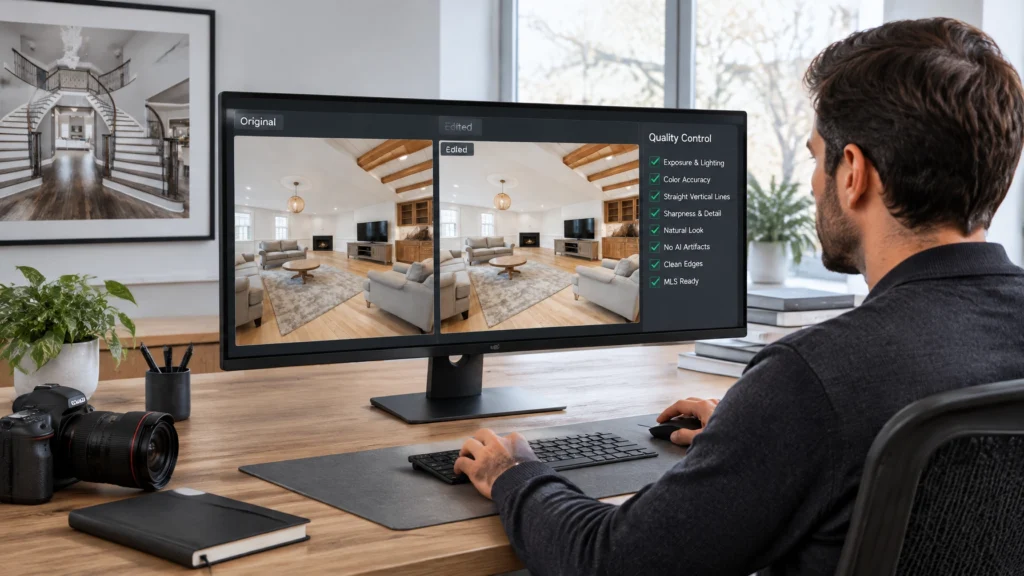
Caption: A documented original-to-edited workflow makes quality control and disclosure easier.
Why Every Media Company Needs a Written AI Policy
A written policy protects the client, the photographer, and the business.
Your policy should define:
- Permitted routine corrections
- Restricted edits that require discussion
- Prohibited alterations
- Virtual staging and renovation labeling
- Client approval requirements
- Disclosure responsibilities
- Original-file retention
- Final quality-control review
- Who makes the final decision when a request is unclear
This also improves client communication. Instead of making a personal decision from scratch on every job, you can point to a professional standard that applies consistently to every listing.
At RE Media Systems, the goal is not to avoid technology. It is to build a workflow where AI handles repetitive work while a professional remains responsible for the final image.
Tools such as AutoHDR can be part of an AI-assisted editing workflow, but every final image still needs human review. Speed is valuable only when the result remains accurate.
For more practical workflow guidance, see the real estate photography editing workflow and AI for real estate photographers.
How to Say No to Misleading Edits
Saying no does not have to sound confrontational. Explain the business reason and offer a compliant alternative.
If a client asks you to remove a defect
“I can correct the exposure and color, but I can’t remove that defect from the listing photo because it changes the condition being represented. I can provide an accurate image and, if useful, create a separately labeled renovation visualization.”
If a client asks you to remove a power line or neighboring property
“I’m not comfortable removing that because it is part of the surrounding view and could affect a buyer’s understanding of the property. I can improve the composition and balance the image, but I need to leave that feature visible.”
If a client asks you to make a room larger
“I can correct the perspective and make sure the room is presented at its best, but I can’t digitally expand the space. That would change the perceived dimensions of the room.”
If a client wants virtual staging
“I can create a virtually staged version as an additional marketing image. I recommend keeping the accurate room photo in the gallery and labeling the staged image clearly so buyers understand what they are seeing.”
The best alternative is often not “no.” It is “not in the documentary image, but here is a transparent way to offer that visualization.”
REMS AI Listing Photo Checklist
Before delivering AI-assisted listing media, ask:
Accuracy
- Does the image still represent the property as photographed?
- Did AI add, remove, or change anything material?
- Are permanent features, views, dimensions, and defects represented accurately?
- Did the edit create an object or surface that does not exist?
Disclosure
- Does the image require an AI, digitally altered, or virtually staged label?
- Does the client know what was changed?
- Has the applicable MLS or portal guidance been checked?
- Is the original image available where required or appropriate?
Quality control
- Did you inspect windows, mirrors, reflections, edges, furniture, and architectural lines?
- Did AI create strange textures, duplicate objects, or impossible shadows?
- Is the image consistent with the rest of the gallery?
- Would a buyer recognize the property when visiting in person?
Workflow
- Are the original files retained?
- Are edited and staged versions stored separately?
- Is the client approval documented?
- Is your company policy being applied consistently?
A complete listing package should also include accurate supporting media. I believe premium floor plans should be included in every full-service listing package where they are offered, because they help communicate layout and room relationships without altering the photographs. They should support the images: not replace honest photography.
If you use CubiCasa or another floor-plan provider, verify current pricing and service details directly with the provider before quoting or bundling it for clients.
Scott’s Field Notes
I have no interest in going back to a completely manual workflow. AI has earned a place in professional real estate photography because it can reduce repetitive editing work and help us deliver more consistently.
But I also do not want to deliver a beautiful image of a property that does not exist.
My rule is simple:
Use AI to improve the media, not to invent the property.
That standard helps in three ways:
- You shoot faster because repetitive processing becomes more efficient.
- You protect quality because a human still reviews the final result.
- You build a stronger business because clients know your work can be trusted.
That trust is becoming a competitive advantage. As more listing photos become difficult to distinguish from generated imagery, accurate and clearly labeled media will stand out.
Common Mistakes
1. Treating every AI edit as harmless
The tool is not the ethical decision. The result is.
2. Assuming a client request removes your responsibility
A client may request an alteration, but you still need to decide whether you can deliver it professionally.
3. Hiding virtual staging in the main gallery
Virtual staging is useful, but it should be clearly distinguished from the existing condition.
4. Removing clutter without considering what is behind it
A stack of boxes may hide damage or unfinished work. Removing it can create an inaccurate wall or floor.
5. Failing to review AI output
Generative tools can create incorrect reflections, fixtures, furniture proportions, and architectural details.
6. Deleting the original files
Originals support transparency, revisions, and dispute resolution.
7. Assuming one jurisdiction’s rules apply everywhere
California, Wisconsin, NorthstarMLS, and other examples may have different requirements. Verify the rules that apply to your market.
FAQs
Is AI editing allowed in real estate photography?
AI editing may be appropriate for routine corrections, but material alterations can create ethical, MLS, or legal concerns. Verify the applicable rules in your jurisdiction.
What are acceptable AI edits for listing photos?
Exposure balancing, HDR blending, white balance, color correction, sharpening, noise reduction, cropping, and ordinary perspective correction are generally lower-risk when they do not change the property’s representation.
Can I use AI to remove clutter?
Sometimes, but use judgment. If the clutter may conceal a defect or condition, discuss the edit with the client and consider disclosure or leaving the original visible.
Can I remove a power line from a real estate photo?
Removing a significant power line or neighboring property can change the buyer’s understanding of the view and surroundings. I would not remove it from a documentary listing image.
Does virtual staging need to be disclosed?
Disclosure requirements vary by state, province, MLS, portal, and jurisdiction. Clearly label virtual staging and confirm the applicable local requirements.
Can I replace the sky in a property photo?
Sky replacement may require discussion or disclosure depending on the edit and applicable policy. It should not create a false impression of the property’s setting or condition.
Should virtually staged images replace empty-room photos?
No. I recommend delivering the accurate room image and the staged visualization separately, with the staged version clearly labeled.
Should photographers keep original RAW files?
Keeping original files is a strong business practice. It supports transparency, quality control, and the ability to respond to questions about an edit.
What is “housefishing” in real estate?
Housefishing is an informal term for listing imagery that makes a property appear substantially different from its real-world condition. It is not a universal legal classification.
Does using AI make a real estate photographer less professional?
No. Professionalism depends on the accuracy of the result, the quality-control process, and the photographer’s judgment: not whether a tool was used.
Should I tell clients that I use AI?
Yes. A short written policy or client explanation can clarify that AI is used for appropriate editing and processing while material alterations are restricted.
Can AI make a room look larger?
Some tools can alter perceived space, but materially enlarging a room is misleading. Use accurate perspective correction instead.
What should I do if an agent insists on a misleading edit?
Explain the concern professionally, offer an accurate alternative, and decline the edit if it would materially misrepresent the property.
How does provenance help real estate photographers?
Provenance connects an edited image to its original capture. Even without specialized camera features, retaining originals and documenting edits improves transparency.
Sources and Jurisdiction Disclaimer
This article was informed by:
- Real Estate News: AI-modified listing photos blur line between enhancement, deception
- NAR: When Does Enhancing Listing Photos Go Too Far?
- Apple Canada: Apple debuts iPhone 18 Pro and iPhone 18 Pro Max
This article provides general professional guidance and is not legal advice. Requirements for digitally altered images, virtual staging, original-file access, and listing disclosures vary by state, province, MLS, real estate portal, and other jurisdiction. Confirm current requirements with the applicable MLS, regulator, broker, or qualified legal professional before publishing altered media.
Summary
AI is not the problem by itself. Uncontrolled and undisclosed alteration is the problem.
Use AI to:
- Process images faster
- Balance difficult exposures
- Improve consistency
- Offer transparent visualization services
- Deliver better media without unnecessary manual work
Do not use it to:
- Hide defects
- Change architecture
- Alter permanent fixtures
- Manipulate views
- Change perceived dimensions
- Present renovations or staging as existing conditions
The standard I use is straightforward: AI should make the media better, not make the property fictional.
What To Do Next
- Write your company’s AI editing policy.
- Separate green-light, yellow-light, and red-light edits.
- Add an approval and disclosure step to your delivery workflow.
- Retain original files and edited versions.
- Review every AI-assisted image before delivery.
- Explain your standards to agents before a difficult request appears.
- Explore the RE Media Systems Recommended Gear for tools that support reliable photo, editing, and delivery workflows.
- Browse the RE Media Systems resources for practical guidance on HDR, editing, AI, business systems, and real estate media.
Follow RE Media Systems for practical AI workflows that help real-estate photographers work faster without sacrificing professional standards.